

Probleme Mail Empfang (Termine)
Es gibt ein selten auftretendes Problem in Outlook, dann kann ein User Mails empfangen, aber Termineinladungen oder Updates kommen nicht an.
Im Message Trace sieht man dann die Meldung das die Mail aufgrund einer Postfach Regel gelöscht wurde und das obwohl in Outlook Client keine Regeln mehr definiert sind, bzw. alle gelöscht wurden.
In dem Fall handelt es sich um eine korrupte Postfach Regel welche nicht sauber gelöscht wurde und noch weiterhin im Outlook unsichtbar existiert. Um diese Regel zu löschen wird das Programm MFCMAPI benötigt. (https://github.com/stephenegriffin/mfcmapi/releases/tag/22.0.22216.01)
Danach einfach folgenden Schritten dieser Anleitung folgen: https://learn.microsoft.com/en-us/archive/blogs/hkong/how-to-delete-corrupted-hidden-inbox-rules-from-a-mailbox-using-mfcmapi
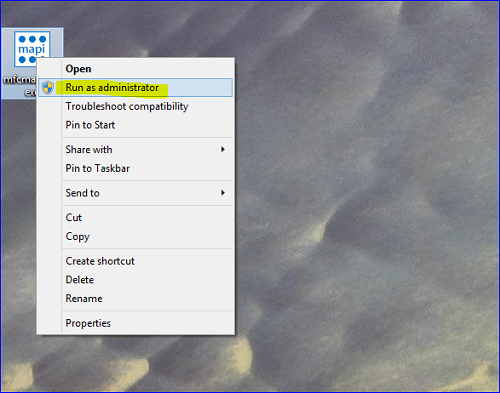
Start MFCMAPI.EXE as Administrator.
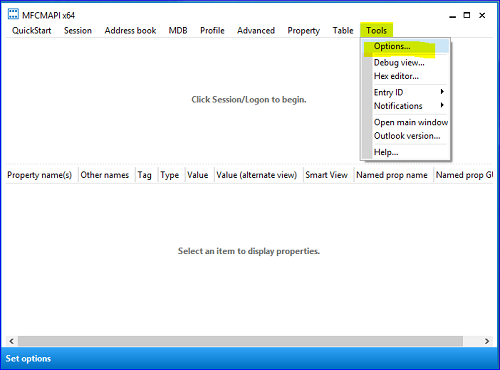
Go to “Tools” > “Options”.
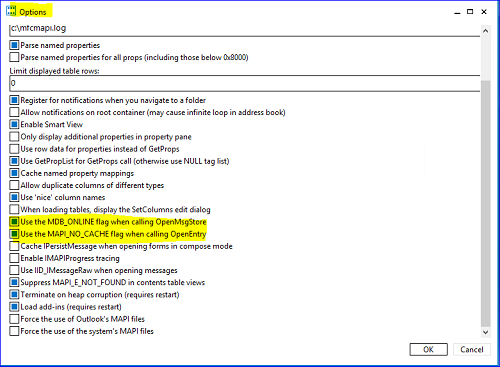
Make sure that “Use the MDB_ONLINE flag when calling OpenMsgStore”
And “Use the MAPI_NO_CACHE flag when calling OpenEntry” are checked. Click “OK”.
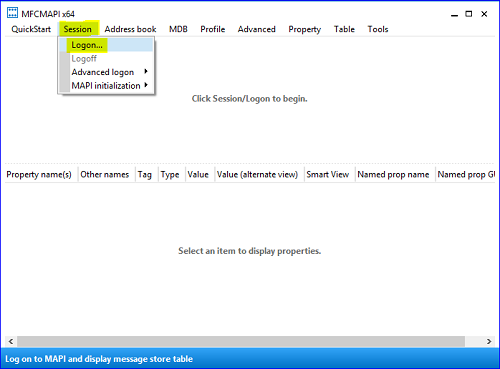
Click on “Session” > “Logon”.
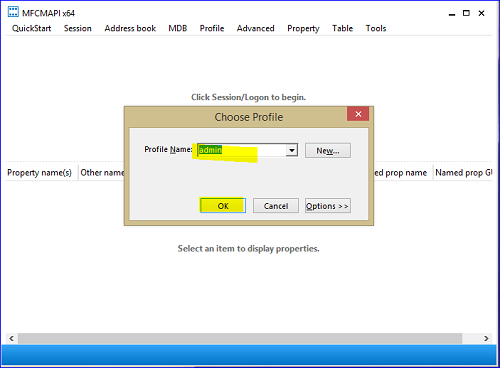
Choose the Outlook profile contains the rules you want to delete > “OK”.
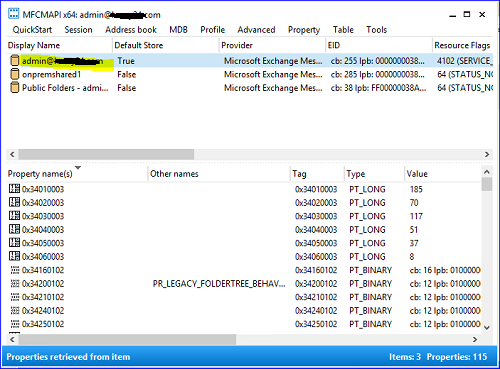
Double click the profile with rules you want to delete.
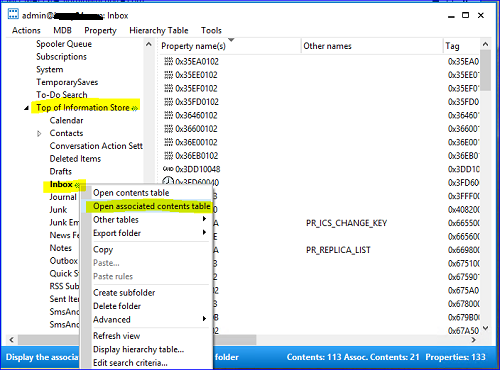
Expand “Root Container” > Scroll down > Expand “Top Information Store”.
Then right click “Inbox” > “Open associated contents table”.
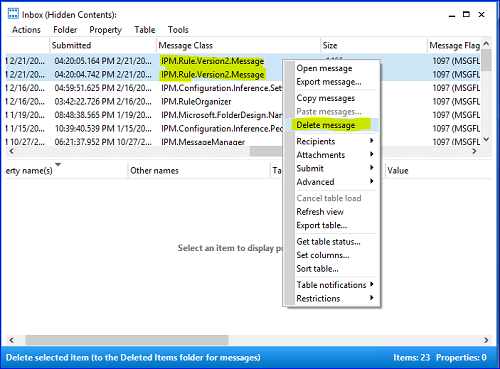
Locate and click the items that have the IPM.Rule.Version2.Message as a “Message Class”
Select all messages you want to delete > Right click > “Delete message”.
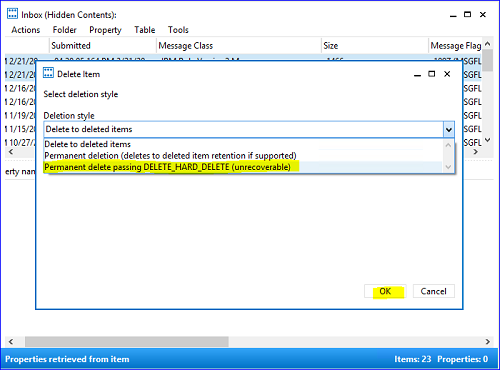
Choose “Permanent delete passing DELETE_HARD_DELETE (unrecoverable)" > “Ok”.
Verwandte Themen
Kuratiert — kann direkt im Editor ergänzt werden://
Failed to execute the [velocity] macro. Cause: [The execution of the [velocity] script macro is not allowed in [xwiki:IT-Wiki.Makros.Verwandte-Themen.WebHome]. Check the rights of its last author or the parameters if it's rendered from another script.]. Click on this message for details.
org.xwiki.rendering.macro.MacroExecutionException: The execution of the [velocity] script macro is not allowed in [xwiki:IT-Wiki.Makros.Verwandte-Themen.WebHome]. Check the rights of its last author or the parameters if it's rendered from another script.
at org.xwiki.rendering.macro.script.AbstractScriptMacro.execute(AbstractScriptMacro.java:178)
at org.xwiki.rendering.macro.script.AbstractScriptMacro.execute(AbstractScriptMacro.java:58)
at org.xwiki.rendering.internal.transformation.macro.MacroTransformation.transform(MacroTransformation.java:441)
at org.xwiki.rendering.internal.transformation.DefaultRenderingContext.transformInContext(DefaultRenderingContext.java:183)
at org.xwiki.rendering.internal.transformation.DefaultTransformationManager.performTransformations(DefaultTransformationManager.java:88)
at org.xwiki.display.internal.DocumentContentAsyncExecutor.executeInCurrentExecutionContext(DocumentContentAsyncExecutor.java:397)
at org.xwiki.display.internal.DocumentContentAsyncExecutor.execute(DocumentContentAsyncExecutor.java:269)
at org.xwiki.display.internal.DocumentContentAsyncRenderer.execute(DocumentContentAsyncRenderer.java:112)
at org.xwiki.rendering.async.internal.block.AbstractBlockAsyncRenderer.render(AbstractBlockAsyncRenderer.java:157)
at org.xwiki.rendering.async.internal.block.AbstractBlockAsyncRenderer.render(AbstractBlockAsyncRenderer.java:54)
at org.xwiki.rendering.async.internal.DefaultAsyncRendererExecutor.syncRender(DefaultAsyncRendererExecutor.java:290)
at org.xwiki.rendering.async.internal.DefaultAsyncRendererExecutor.render(DefaultAsyncRendererExecutor.java:267)
at org.xwiki.rendering.async.internal.block.DefaultBlockAsyncRendererExecutor.execute(DefaultBlockAsyncRendererExecutor.java:125)
at org.xwiki.display.internal.DocumentContentDisplayer.display(DocumentContentDisplayer.java:93)
at org.xwiki.display.internal.DocumentContentDisplayer.display(DocumentContentDisplayer.java:46)
at org.xwiki.display.internal.DefaultDocumentDisplayer.display(DefaultDocumentDisplayer.java:96)
at org.xwiki.display.internal.DefaultDocumentDisplayer.display(DefaultDocumentDisplayer.java:39)
at org.xwiki.sheet.internal.SheetDocumentDisplayer.display(SheetDocumentDisplayer.java:123)
at org.xwiki.sheet.internal.SheetDocumentDisplayer.display(SheetDocumentDisplayer.java:52)
at org.xwiki.display.internal.ConfiguredDocumentDisplayer.display(ConfiguredDocumentDisplayer.java:68)
at org.xwiki.display.internal.ConfiguredDocumentDisplayer.display(ConfiguredDocumentDisplayer.java:42)
at com.xpn.xwiki.doc.XWikiDocument.display(XWikiDocument.java:1433)
at com.xpn.xwiki.doc.XWikiDocument.getRenderedContent(XWikiDocument.java:1569)
at com.xpn.xwiki.doc.XWikiDocument.displayDocument(XWikiDocument.java:1519)
at com.xpn.xwiki.doc.XWikiDocument.displayDocument(XWikiDocument.java:1488)
at com.xpn.xwiki.api.Document.displayDocument(Document.java:822)
at jdk.internal.reflect.GeneratedMethodAccessor437.invoke(Unknown Source)
at java.base/jdk.internal.reflect.DelegatingMethodAccessorImpl.invoke(Unknown Source)
at java.base/java.lang.reflect.Method.invoke(Unknown Source)
at org.apache.velocity.util.introspection.UberspectImpl$VelMethodImpl.doInvoke(UberspectImpl.java:571)
at org.apache.velocity.util.introspection.UberspectImpl$VelMethodImpl.invoke(UberspectImpl.java:554)
at org.apache.velocity.runtime.parser.node.ASTMethod.execute(ASTMethod.java:221)
at org.apache.velocity.runtime.parser.node.ASTReference.execute(ASTReference.java:368)
at org.apache.velocity.runtime.parser.node.ASTReference.value(ASTReference.java:704)
at org.apache.velocity.runtime.parser.node.ASTExpression.value(ASTExpression.java:75)
at org.apache.velocity.runtime.parser.node.ASTSetDirective.render(ASTSetDirective.java:242)
at org.apache.velocity.runtime.parser.node.ASTBlock.render(ASTBlock.java:147)
at org.apache.velocity.runtime.parser.node.SimpleNode.render(SimpleNode.java:439)
at org.apache.velocity.runtime.parser.node.ASTIfStatement.render(ASTIfStatement.java:190)
at org.apache.velocity.runtime.parser.node.ASTBlock.render(ASTBlock.java:147)
at org.xwiki.velocity.internal.directive.TryCatchDirective.render(TryCatchDirective.java:86)
at org.apache.velocity.runtime.parser.node.ASTDirective.render(ASTDirective.java:304)
at org.apache.velocity.runtime.parser.node.SimpleNode.render(SimpleNode.java:439)
at org.apache.velocity.Template.merge(Template.java:358)
at org.apache.velocity.Template.merge(Template.java:262)
at org.xwiki.velocity.internal.InternalVelocityEngine.evaluate(InternalVelocityEngine.java:233)
at com.xpn.xwiki.internal.template.VelocityTemplateEvaluator.evaluateContent(VelocityTemplateEvaluator.java:107)
at com.xpn.xwiki.internal.template.TemplateAsyncRenderer.evaluateContent(TemplateAsyncRenderer.java:219)
at com.xpn.xwiki.internal.template.TemplateAsyncRenderer.renderVelocity(TemplateAsyncRenderer.java:174)
at com.xpn.xwiki.internal.template.TemplateAsyncRenderer.render(TemplateAsyncRenderer.java:135)
at com.xpn.xwiki.internal.template.TemplateAsyncRenderer.render(TemplateAsyncRenderer.java:54)
at org.xwiki.rendering.async.internal.DefaultAsyncRendererExecutor.lambda$syncRender$0(DefaultAsyncRendererExecutor.java:284)
at com.xpn.xwiki.internal.security.authorization.DefaultAuthorExecutor.call(DefaultAuthorExecutor.java:98)
at org.xwiki.rendering.async.internal.DefaultAsyncRendererExecutor.syncRender(DefaultAsyncRendererExecutor.java:284)
at org.xwiki.rendering.async.internal.DefaultAsyncRendererExecutor.render(DefaultAsyncRendererExecutor.java:267)
at org.xwiki.rendering.async.internal.block.DefaultBlockAsyncRendererExecutor.render(DefaultBlockAsyncRendererExecutor.java:154)
at com.xpn.xwiki.internal.template.InternalTemplateManager.render(InternalTemplateManager.java:869)
at com.xpn.xwiki.internal.template.InternalTemplateManager.renderFromSkin(InternalTemplateManager.java:831)
at com.xpn.xwiki.internal.template.InternalTemplateManager.render(InternalTemplateManager.java:818)
at com.xpn.xwiki.internal.template.InternalTemplateManager.renderNoException(InternalTemplateManager.java:773)
at com.xpn.xwiki.internal.template.InternalTemplateManager.renderNoException(InternalTemplateManager.java:765)
at com.xpn.xwiki.internal.template.DefaultTemplateManager.renderNoException(DefaultTemplateManager.java:79)
at com.xpn.xwiki.internal.template.DefaultTemplateManager.renderNoException(DefaultTemplateManager.java:73)
at org.xwiki.template.script.TemplateScriptService.render(TemplateScriptService.java:54)
at jdk.internal.reflect.GeneratedMethodAccessor177.invoke(Unknown Source)
at java.base/jdk.internal.reflect.DelegatingMethodAccessorImpl.invoke(Unknown Source)
at java.base/java.lang.reflect.Method.invoke(Unknown Source)
at org.apache.velocity.util.introspection.UberspectImpl$VelMethodImpl.doInvoke(UberspectImpl.java:571)
at org.apache.velocity.util.introspection.UberspectImpl$VelMethodImpl.invoke(UberspectImpl.java:554)
at org.apache.velocity.runtime.parser.node.ASTMethod.execute(ASTMethod.java:221)
at org.apache.velocity.runtime.parser.node.ASTReference.execute(ASTReference.java:368)
at org.apache.velocity.runtime.parser.node.ASTReference.render(ASTReference.java:492)
at org.apache.velocity.runtime.parser.node.ASTBlock.render(ASTBlock.java:147)
at org.apache.velocity.runtime.directive.VelocimacroProxy.render(VelocimacroProxy.java:217)
at org.apache.velocity.runtime.directive.RuntimeMacro.render(RuntimeMacro.java:331)
at org.apache.velocity.runtime.directive.RuntimeMacro.render(RuntimeMacro.java:261)
at org.apache.velocity.runtime.parser.node.ASTDirective.render(ASTDirective.java:304)
at org.apache.velocity.runtime.parser.node.SimpleNode.render(SimpleNode.java:439)
at org.apache.velocity.Template.merge(Template.java:358)
at org.apache.velocity.Template.merge(Template.java:262)
at org.xwiki.velocity.internal.InternalVelocityEngine.evaluate(InternalVelocityEngine.java:233)
at com.xpn.xwiki.internal.template.VelocityTemplateEvaluator.evaluateContent(VelocityTemplateEvaluator.java:107)
at com.xpn.xwiki.internal.template.TemplateAsyncRenderer.evaluateContent(TemplateAsyncRenderer.java:219)
at com.xpn.xwiki.internal.template.TemplateAsyncRenderer.renderVelocity(TemplateAsyncRenderer.java:174)
at com.xpn.xwiki.internal.template.TemplateAsyncRenderer.render(TemplateAsyncRenderer.java:135)
at com.xpn.xwiki.internal.template.TemplateAsyncRenderer.render(TemplateAsyncRenderer.java:54)
at org.xwiki.rendering.async.internal.DefaultAsyncRendererExecutor.lambda$syncRender$0(DefaultAsyncRendererExecutor.java:284)
at com.xpn.xwiki.internal.security.authorization.DefaultAuthorExecutor.call(DefaultAuthorExecutor.java:98)
at org.xwiki.rendering.async.internal.DefaultAsyncRendererExecutor.syncRender(DefaultAsyncRendererExecutor.java:284)
at org.xwiki.rendering.async.internal.DefaultAsyncRendererExecutor.render(DefaultAsyncRendererExecutor.java:267)
at org.xwiki.rendering.async.internal.block.DefaultBlockAsyncRendererExecutor.render(DefaultBlockAsyncRendererExecutor.java:154)
at com.xpn.xwiki.internal.template.InternalTemplateManager.render(InternalTemplateManager.java:869)
at com.xpn.xwiki.internal.template.InternalTemplateManager.renderFromSkin(InternalTemplateManager.java:831)
at com.xpn.xwiki.internal.template.InternalTemplateManager.render(InternalTemplateManager.java:818)
at com.xpn.xwiki.internal.template.InternalTemplateManager.renderNoException(InternalTemplateManager.java:773)
at com.xpn.xwiki.internal.template.InternalTemplateManager.renderNoException(InternalTemplateManager.java:765)
at com.xpn.xwiki.internal.template.DefaultTemplateManager.renderNoException(DefaultTemplateManager.java:79)
at com.xpn.xwiki.internal.template.DefaultTemplateManager.renderNoException(DefaultTemplateManager.java:73)
at org.xwiki.template.script.TemplateScriptService.render(TemplateScriptService.java:54)
at jdk.internal.reflect.GeneratedMethodAccessor177.invoke(Unknown Source)
at java.base/jdk.internal.reflect.DelegatingMethodAccessorImpl.invoke(Unknown Source)
at java.base/java.lang.reflect.Method.invoke(Unknown Source)
at org.apache.velocity.util.introspection.UberspectImpl$VelMethodImpl.doInvoke(UberspectImpl.java:571)
at org.apache.velocity.util.introspection.UberspectImpl$VelMethodImpl.invoke(UberspectImpl.java:554)
at org.apache.velocity.runtime.parser.node.ASTMethod.execute(ASTMethod.java:221)
at org.apache.velocity.runtime.parser.node.ASTReference.execute(ASTReference.java:368)
at org.apache.velocity.runtime.parser.node.ASTReference.render(ASTReference.java:492)
at org.apache.velocity.runtime.parser.node.ASTBlock.render(ASTBlock.java:147)
at org.apache.velocity.runtime.directive.VelocimacroProxy.render(VelocimacroProxy.java:217)
at org.apache.velocity.runtime.directive.RuntimeMacro.render(RuntimeMacro.java:331)
at org.apache.velocity.runtime.directive.RuntimeMacro.render(RuntimeMacro.java:261)
at org.apache.velocity.runtime.parser.node.ASTDirective.render(ASTDirective.java:304)
at org.apache.velocity.runtime.parser.node.ASTBlock.render(ASTBlock.java:147)
at org.apache.velocity.runtime.parser.node.ASTIfStatement.render(ASTIfStatement.java:171)
at org.apache.velocity.runtime.parser.node.ASTBlock.render(ASTBlock.java:147)
at org.apache.velocity.runtime.parser.node.SimpleNode.render(SimpleNode.java:439)
at org.apache.velocity.runtime.parser.node.ASTIfStatement.render(ASTIfStatement.java:190)
at org.apache.velocity.runtime.parser.node.SimpleNode.render(SimpleNode.java:439)
at org.apache.velocity.Template.merge(Template.java:358)
at org.apache.velocity.Template.merge(Template.java:262)
at org.xwiki.velocity.internal.InternalVelocityEngine.evaluate(InternalVelocityEngine.java:233)
at com.xpn.xwiki.internal.template.VelocityTemplateEvaluator.evaluateContent(VelocityTemplateEvaluator.java:107)
at com.xpn.xwiki.internal.template.TemplateAsyncRenderer.evaluateContent(TemplateAsyncRenderer.java:219)
at com.xpn.xwiki.internal.template.TemplateAsyncRenderer.renderVelocity(TemplateAsyncRenderer.java:174)
at com.xpn.xwiki.internal.template.TemplateAsyncRenderer.render(TemplateAsyncRenderer.java:135)
at com.xpn.xwiki.internal.template.TemplateAsyncRenderer.render(TemplateAsyncRenderer.java:54)
at org.xwiki.rendering.async.internal.DefaultAsyncRendererExecutor.lambda$syncRender$0(DefaultAsyncRendererExecutor.java:284)
at com.xpn.xwiki.internal.security.authorization.DefaultAuthorExecutor.call(DefaultAuthorExecutor.java:98)
at org.xwiki.rendering.async.internal.DefaultAsyncRendererExecutor.syncRender(DefaultAsyncRendererExecutor.java:284)
at org.xwiki.rendering.async.internal.DefaultAsyncRendererExecutor.render(DefaultAsyncRendererExecutor.java:267)
at org.xwiki.rendering.async.internal.block.DefaultBlockAsyncRendererExecutor.render(DefaultBlockAsyncRendererExecutor.java:154)
at com.xpn.xwiki.internal.template.InternalTemplateManager.render(InternalTemplateManager.java:869)
at com.xpn.xwiki.internal.template.InternalTemplateManager.renderFromSkin(InternalTemplateManager.java:831)
at com.xpn.xwiki.internal.template.InternalTemplateManager.renderFromSkin(InternalTemplateManager.java:811)
at com.xpn.xwiki.internal.template.InternalTemplateManager.render(InternalTemplateManager.java:797)
at com.xpn.xwiki.internal.template.DefaultTemplateManager.render(DefaultTemplateManager.java:91)
at com.xpn.xwiki.internal.template.DefaultTemplateManager.render(DefaultTemplateManager.java:85)
at com.xpn.xwiki.XWiki.evaluateTemplate(XWiki.java:2552)
at com.xpn.xwiki.web.Utils.parseTemplate(Utils.java:180)
at com.xpn.xwiki.web.XWikiAction.execute(XWikiAction.java:651)
at com.xpn.xwiki.web.XWikiAction.execute(XWikiAction.java:339)
at com.xpn.xwiki.web.LegacyActionServlet.service(LegacyActionServlet.java:111)
at jakarta.servlet.http.HttpServlet.service(HttpServlet.java:723)
at org.eclipse.jetty.ee11.servlet.ServletHolder$NotAsync.service(ServletHolder.java:1397)
at org.eclipse.jetty.ee11.servlet.ServletHolder.handle(ServletHolder.java:754)
at org.eclipse.jetty.ee11.servlet.ServletHandler$ChainEnd.doFilter(ServletHandler.java:1668)
at com.xpn.xwiki.web.ActionFilter.doFilter(ActionFilter.java:123)
at org.eclipse.jetty.ee11.servlet.FilterHolder.doFilter(FilterHolder.java:205)
at org.eclipse.jetty.ee11.servlet.ServletHandler$Chain.doFilter(ServletHandler.java:1640)
at org.xwiki.wysiwyg.filter.ConversionFilter.doFilter(ConversionFilter.java:71)
at org.eclipse.jetty.ee11.servlet.FilterHolder.doFilter(FilterHolder.java:205)
at org.eclipse.jetty.ee11.servlet.ServletHandler$Chain.doFilter(ServletHandler.java:1640)
at org.xwiki.container.servlet.filters.internal.SetHTTPHeaderFilter.doFilter(SetHTTPHeaderFilter.java:66)
at org.eclipse.jetty.ee11.servlet.FilterHolder.doFilter(FilterHolder.java:205)
at org.eclipse.jetty.ee11.servlet.ServletHandler$Chain.doFilter(ServletHandler.java:1640)
at org.xwiki.resource.servlet.RoutingFilter.doFilter(RoutingFilter.java:135)
at org.eclipse.jetty.ee11.servlet.FilterHolder.doFilter(FilterHolder.java:205)
at org.eclipse.jetty.ee11.servlet.ServletHandler$Chain.doFilter(ServletHandler.java:1640)
at org.xwiki.container.servlet.filters.internal.SavedRequestRestorerFilter.doFilter(SavedRequestRestorerFilter.java:212)
at org.eclipse.jetty.ee11.servlet.FilterHolder.doFilter(FilterHolder.java:205)
at org.eclipse.jetty.ee11.servlet.ServletHandler$Chain.doFilter(ServletHandler.java:1640)
at org.xwiki.container.servlet.filters.internal.SafeRedirectFilter.doFilter(SafeRedirectFilter.java:106)
at org.eclipse.jetty.ee11.servlet.FilterHolder.doFilter(FilterHolder.java:205)
at org.eclipse.jetty.ee11.servlet.ServletHandler$Chain.doFilter(ServletHandler.java:1640)
at org.xwiki.container.servlet.filters.internal.ResolveRelativeRedirectFilter.doFilter(ResolveRelativeRedirectFilter.java:129)
at org.eclipse.jetty.ee11.servlet.FilterHolder.doFilter(FilterHolder.java:205)
at org.eclipse.jetty.ee11.servlet.ServletHandler$Chain.doFilter(ServletHandler.java:1640)
at org.xwiki.container.servlet.filters.internal.SourceURLResolverFilter.doFilter(SourceURLResolverFilter.java:177)
at org.eclipse.jetty.ee11.servlet.FilterHolder.doFilter(FilterHolder.java:205)
at org.eclipse.jetty.ee11.servlet.ServletHandler$Chain.doFilter(ServletHandler.java:1640)
at org.xwiki.container.servlet.filters.internal.SetCharacterEncodingFilter.doFilter(SetCharacterEncodingFilter.java:120)
at org.eclipse.jetty.ee11.servlet.FilterHolder.doFilter(FilterHolder.java:208)
at org.eclipse.jetty.ee11.servlet.ServletHandler$Chain.doFilter(ServletHandler.java:1640)
at org.eclipse.jetty.ee11.websocket.servlet.WebSocketUpgradeFilter.doFilter(WebSocketUpgradeFilter.java:199)
at org.eclipse.jetty.ee11.servlet.FilterHolder.doFilter(FilterHolder.java:205)
at org.eclipse.jetty.ee11.servlet.ServletHandler$Chain.doFilter(ServletHandler.java:1640)
at org.eclipse.jetty.ee11.servlet.ServletHandler$MappedServlet.handle(ServletHandler.java:1602)
at org.eclipse.jetty.ee11.servlet.ServletChannel.dispatch(ServletChannel.java:871)
at org.eclipse.jetty.ee11.servlet.ServletChannel.handle(ServletChannel.java:449)
at org.eclipse.jetty.ee11.servlet.ServletHandler.handle(ServletHandler.java:469)
at org.eclipse.jetty.security.SecurityHandler.handle(SecurityHandler.java:546)
at org.eclipse.jetty.ee11.servlet.SessionHandler.handle(SessionHandler.java:763)
at org.eclipse.jetty.server.handler.ContextHandler.handle(ContextHandler.java:1226)
at org.eclipse.jetty.server.handler.ContextHandlerCollection.handle(ContextHandlerCollection.java:178)
at org.eclipse.jetty.server.Server.handle(Server.java:197)
at org.eclipse.jetty.server.internal.HttpChannelState$HandlerInvoker.run(HttpChannelState.java:788)
at org.eclipse.jetty.server.internal.HttpConnection.onFillable(HttpConnection.java:420)
at org.eclipse.jetty.server.internal.HttpConnection$FillableCallback.succeeded(HttpConnection.java:1809)
at org.eclipse.jetty.io.FillInterest.fillable(FillInterest.java:105)
at org.eclipse.jetty.io.SelectableChannelEndPoint$1.run(SelectableChannelEndPoint.java:54)
at org.eclipse.jetty.util.thread.strategy.AdaptiveExecutionStrategy.runTask(AdaptiveExecutionStrategy.java:492)
at org.eclipse.jetty.util.thread.strategy.AdaptiveExecutionStrategy.epcRunTask(AdaptiveExecutionStrategy.java:428)
at org.eclipse.jetty.util.thread.strategy.AdaptiveExecutionStrategy.consumeTask(AdaptiveExecutionStrategy.java:401)
at org.eclipse.jetty.util.thread.strategy.AdaptiveExecutionStrategy.tryProduce(AdaptiveExecutionStrategy.java:255)
at org.eclipse.jetty.util.thread.strategy.AdaptiveExecutionStrategy.run(AdaptiveExecutionStrategy.java:204)
at org.eclipse.jetty.util.thread.ReservedThreadExecutor$ReservedThread.run(ReservedThreadExecutor.java:317)
at org.eclipse.jetty.util.thread.QueuedThreadPool.runJob(QueuedThreadPool.java:1009)
at org.eclipse.jetty.util.thread.QueuedThreadPool$Runner.doRunJob(QueuedThreadPool.java:1240)
at org.eclipse.jetty.util.thread.QueuedThreadPool$Runner.run(QueuedThreadPool.java:1194)
at java.base/java.lang.Thread.run(Unknown Source)
Status: Migriert — Team-Review ausstehend · Owner: (festlegen) · Letzter Review: 2026-06-11